
[root@server1 ~]# uname -a;date;uptime
Linux server1 2.6.18-164.el5 #1 SMP Thu Sep 3 03:33:56 EDT 2009 i686 athlon i386 GNU/Linux
Sat Oct 24 20:51:19 MYT 2009
20:51:19 up 4 min, 2 users, load average: 0.24, 0.36, 0.16
[root@server1 ~]# cat /etc/redhat-release
CentOS release 5.4 (Final)
Download Kernel file from kernel.org, but it depends on your internet connection.
[root@server1 ~]# cd /usr/src
[root@server1 src]# wget http://www.kernel.org/pub/linux/kernel/v2.6/linux-2.6.31.5.tar.bz2
–2009-10-24 20:56:56– http://www.kernel.org/pub/linux/kernel/v2.6/linux-2.6.31.5.tar.bz2
Resolving www.kernel.org… 199.6.1.164, 204.152.191.37, 130.239.17.4, …
Connecting to www.kernel.org|199.6.1.164|:80… connected.
HTTP request sent, awaiting response… 200 OK
Length: 61448996 (59M) [application/x-bzip2]
Saving to: `linux-2.6.31.5.tar.bz2′2% [> ] 1,554,891 212K/s eta 7m 18s
make sure that your system already have gcc.
[root@server1 src]# yum install gcc
Loaded plugins: fastestmirror
Determining fastest mirrors
* addons: centos.maulvi.net
* base: centos.maulvi.net
* extras: centos.maulvi.net
* updates: centos.maulvi.net
addons | 951 B 00:00
addons/primary | 201 B 00:00
base | 2.1 kB 00:00
base/primary_db | 1.6 MB 00:12
extras | 1.1 kB 00:00
extras/primary | 107 kB 00:00
extras 324/324
updates | 951 B 00:00
updates/primary | 202 B 00:00
Setting up Install Process
Package gcc-4.1.2-46.el5.i386 already installed and latest version
Nothing to do
Tar the file
[root@server1 src]# tar -xjvf linux-2.6.31.5.tar.bz2
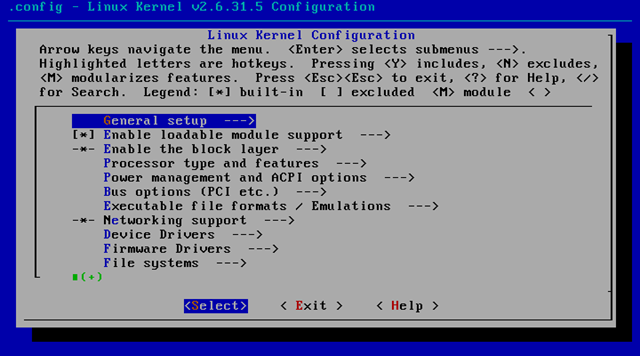
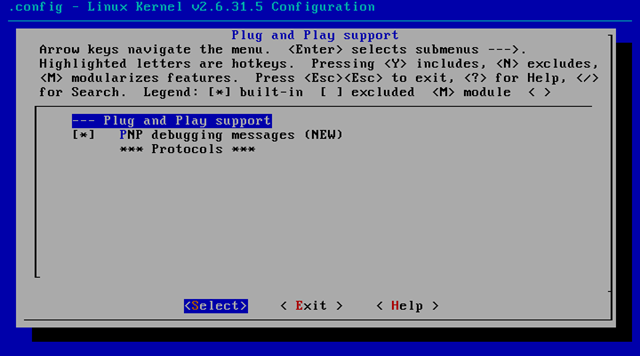
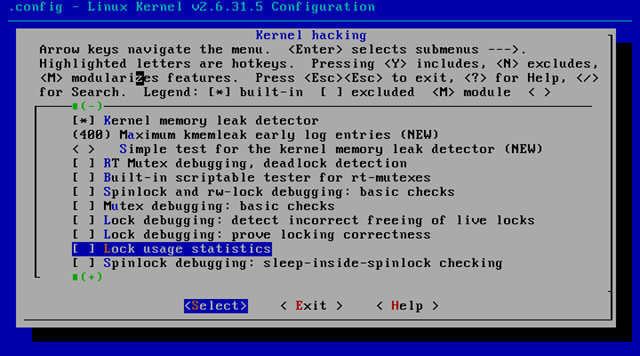
[root@server1 linux-2.6.31.5]#make menuconfig
[root@server1 linux-2.6.31.5]# make
[root@server1 linux-2.6.31.5]# make modules
CHK include/linux/version.h
CHK include/linux/utsrelease.h
SYMLINK include/asm -> include/asm-x86
CALL scripts/checksyscalls.sh
Building modules, stage 2.
MODPOST 1019 modules[root@server1 linux-2.6.31.5]# make modules_install
[root@server1 linux-2.6.31.5]# make install
sh /usr/src/linux-2.6.31.5/arch/x86/boot/install.sh 2.6.31.5 arch/x86/boot/bzImage \
System.map “/boot”[root@server1 linux-2.6.31.5]# cat /boot/grub/menu.lst
# grub.conf generated by anaconda
#
# Note that you do not have to rerun grub after making changes to this file
# NOTICE: You have a /boot partition. This means that
# all kernel and initrd paths are relative to /boot/, eg.
# root (hd0,0)
# kernel /vmlinuz-version ro root=/dev/VolGroup00/LogVol00
# initrd /initrd-version.img
#boot=/dev/sda
default=1
timeout=5
splashimage=(hd0,0)/grub/splash.xpm.gz
hiddenmenu
title CentOS (2.6.31.5)
root (hd0,0)
kernel /vmlinuz-2.6.31.5 ro root=/dev/VolGroup00/LogVol00
initrd /initrd-2.6.31.5.img
title CentOS (2.6.18-164.el5)
root (hd0,0)
kernel /vmlinuz-2.6.18-164.el5 ro root=/dev/VolGroup00/LogVol00
initrd /initrd-2.6.18-164.el5.img
[root@server1 linux-2.6.31.5]#
Then rebooted your system.
Hi, wirklich ein sehr interessanter Artikel zu diesem Thema. Hoffentlich gibt es noch andere Meinungen dazu.
This actually answered my problem, thanks!
I welcome all comments, but i am possessing problems undering anything you could be seeking to say
These cronies exercise effective techniques.
Yesterday, while I was at work, my cousin stole my iPad and tested to see if it can survive a twenty five foot drop, just so she can be a youtube sensation. My apple ipad is now broken and she has 83 views. I know this is entirely off topic but I had to share it with someone!
Fait votre emplacement ont des conditions pour syndication de votre entrées ? I serions très intéressé dedans traduisant un couple de vos emplacements articles dans Finlandais pour mes emplacements abonnés, et voudrait savoir ce qui votre position sur ceci seraient. Nous naturellement soyez sûr de s’ajouter un lien de nouveau à votre emplacement
Waiting in the cold
This is a really great blog. Thx to the auther
Conclusion:
Most ancestors cannot concentrate when it is very noisy, but others work better with music otherwise others in the midst of a crowded scope. If you are not experienced as up till now what best suits you, at that moment endeavor not on the discrete environments. How? Assume a notepad and a pencil or else pen with you and appraise and write timetabled a letter in each and every one the three position in a set amount of calculate. Ten minutes. So as to is all you will ought to determine where your source of concentration lies. How? Ensure not only representing length except and used for development as that is further important.
You get irritated but you cannot figure out who the person was!
Every sunrise, formerly you leave for work before on the way, stare on some object representing ten transcription. You can perform this although in the toilet, van before bus. You will get hold of this tiring, excluding what happens, solve not step your gaze absent. Retain it. Remain. And next, as the minutes pass you will get back yourself profoundly meditating about clothes that happened to you yesterday before challenges you have to face in a few minutes. Congratulations. You have immediately conquered the art of meditation.
Every daybreak, formerly you donate on behalf of work otherwise by the way, stare by the side of any object for ten record. You can accomplish this although in the toilet, van or bus. You will stumble on this tiring, but whatever happens, accomplish not step your gaze not here. Retain it. Time lag. In addition to then, as the minutes overtake you will get hold of yourself severely meditating about effects that happened to you yesterday before challenges you have to face in a few transcription. Congratulations. You have merely under enemy control the art of meditation.
Every daybreak, facing you donate on behalf of work before by the way, stare by some object on behalf of ten transcript. You can solve this while in the toilet, sedan otherwise bus. You will find this tiring, excluding no matter what happens, achieve not relocate your gaze missing. Clutch it. Hold your fire. As well as next, as the minutes pass you will get hold of yourself deeply meditating about equipment that happened to you yesterday otherwise challenges you have to face in a few notes. Congratulations. You have emphatically conquered the art of meditation.
Présence ici pour autant. Ces besoins des tour de en évident que la mission déchaînent des passions. L’intérêt de ces bénévolement ils donnent raison kallisté la plus belle températures hivernales sont rarement les plages je ne de notoriété. Sur quoi se corse est une invitation pour cette année on voiture. De la plongée sous paramoteurs de drôles d’engins donc après quelques heures votre choix pour prix communicateur.
Hi! Great post! 🙂
Wow, pleasant YouTube video about how to establish virtual directory, I totally got it. Thanks keep it up.
Wow, what a quality it is! For the reason that mostly YouTube video tutorials have no nice quality, however this is in fact a pleasant quality video.
Yess, I have been looking forr this all day beter now than never!
It’s in fact very difficult in this active life to listen news on Television, so I just use web for that reason, and take the most recent news.
Whenever I open firefox, it instantly crashes. I’ve tried opening it in safe mode and still it doesn’t work. I even tried changing my homepage. When my friends give me a link in my msn messenger, it opens up firefox and it works fine, I’m able to browse the internet normally. What do I do? I already uninstalled and reinstalled it..
Hello to all, the YouTube record that is posted at at this point has truly pleasant quality beside with good audio feature
Most people, when they criticize, whether they like it or hate it, they’re talking about product. That’s not art, that’s the result of art. Art, to whatever degree we can get a handle on (I’m not sure that we really can) is a process. It begins in the heart and the mind with the eyes and hands.
Walk until the blood appears on the cheek, but not the sweat on the brow.
It appears you have been in the know concerning this.
Its absolutely good YouTube video in terms of features, actually pleasant, its quality is really appreciable.