Unifi Update DNS on TRG212M router
To all the Unifi user, by default your router is not allowed user to update the DNS setting. and its not visible by admin account.
Here is the step you can follow to change your DNS setting
1. Login to the router using below credentials
- Username: operator
- Password (default unifi password ): h566UniFi
2. Go to Setup Tab
3. Click on the WAN at the left

4. On the 1_INTERNET_R Click on the edit button in red circle (as per picture) – edit – Credit DE SOPHEA
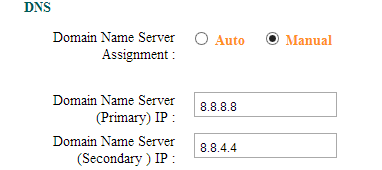
5. On the DNS setting tick on Manual radio button and configure your DNS to Google DNS
- Primary: 8.8.8.8
- Secondary: 8.8.4.4
6. Apply the setting
the new unifi configuration does not have wan tab, do u have any other ways to do it
http://i.imgur.com/jB1cR4T.jpg
i dont have information on the router
thanks. i thought username : admin will be full access to the gateway. that why i didn’t find the way to change the DNS setting. yeah finally i found it. appreciated you share it here.
Thanks muchly.
hi u know how to change the unifi latest router TRG212M_V2.7.0 DNS
The UniFi connection in my house is not stable resulting in intermittent lagging. I tested my device in the vendor shop and there is no lagging at all. My router is trg212m. Would appreciate your advice.
Will a firmware upgrade resolve the problem? Is there any firmware upgrade for trg212m?
Thank you.
thank you sir..
hi why my router dont have WAN.? please help where i can find it.
i forget my dns password, and i cnt find it anywhere…is there any way to login to the 192.168.0.1 front page?
Works great.. Thanks!
login using this for full acces 😉
username : operator
password : h566UniFi
just happened to encounter problem today but its solved now… thanks
To access to WAN, u need to login with –
username – operator
password – h566UniFi
Thanks for this information best regards
Hi,
Seems the uinfi does not work on the TRG212M anymore.
What can I do to access in to modify dns
I mean the the operator password. Cannot use to access to TRG212M anymore.
Operator password not working for me also. Something seems broken with dns also, connections only working when I manually use static DNS.
LAST TIME I WAS REBOOT MY OFFICEROUTER ON TRG212M .
HOW CAN I LOGIN BY DEFAULT IP AGAIN …
NOW CANNOT CONNET BY DEFAULT IP http://203.106.118.69/cgi-bin/webproc
Thank you bro!
Its working with the latest model.
hi, was able to get in and change the settings, but it doesnt reflect on my devices… have restarted everything…
i have changed my password it is no more as below
username – operator
password – h566UniFi
Now i can’t remember, i will hard reset this TRG212M. But need to know what are the important info i need to get to setup TRG212M as per original installed by TM Unifi
Works Great,
Just login with operator access.